Showing posts with label R-project. Show all posts

Monday, January 16, 2012

Using multiple processor cores in R-Projet

My laptop is equipped with a Core i7 processor with 4 cores that can execute in parallel 8 processes. My R-Project computations use only one single core, if I use the default instructions. I have ended up by thinking that it is a pity that other cores are just sitting idle (sort of), instead of contributing to the speed of my computations, even if I do not run yet really heavy ones in my research. As a consequence, I have started to look for an easy way to use all cores in R-project. And, indeed, there is an easy solution to this problem. It uses the doMC library, and the instructions foreach and %dopar%.
For example, for computing linear models with different dependent variables and a given set of exogenous ones, one can do the following computations:
library(doMC) # There are other parallel computing libraries
registerDoMC() # You mud register one of them for foreach
getDoParWorkers() # Indicates you how many cores have been detected by registerDoMC()

Suppose that you have a dataset called mydata, containing the dependent variables y1, y2, y3, and the independent variables, x1,x2,x3.
We can execute in parallel the estimation of linear models of each y on the set of independent variables, by executing the following code:
myVariableList <- c("y1", "y2", "y3")
results <- foreach(i = 1:length(myVariableList),.errorhandling="stop",.inorder=TRUE)
%dopar% {
model <- lm(as.formula(paste(myVariableList[i],"~x1+x2+x3")),data=mydata)
return(model)
}
%dopar% executes these estimations on different cores, in parallel and a list of the estimated models is saved in the variable results.
We can now look at the characteristics of the estimated models, by printing them successively on the output of R:

for (i in 1:length(results)) { print(summary(results[[i]])) }
Voilà!

Of course, this possibility is especially useful for more complex computations, like stepwise regressions with many independent variables, that can take some time, or regression trees with big datasets, etc.

Friday, December 30, 2011

Using Penn World Tables with R-Project, the easy way

Penn World Tables (PWT) is a very nice data collection on economic growth. It covers a large set of countries (from their web site):

« The Penn World Table provides purchasing power parity and national income accounts converted to international prices for 189 countries/territories for some or all of the years 1950-2009. The European Union or the OECD provide more detailed purchasing power and real product estimates for their countries and the World Bank makes current price estimates for most PWT countries at the GDP level. »

I use these data for creating graphics for my economic growth course. My workflow was based on importing them in csv format into R-Project. But I have very recently discovered that there is much better way of using them ;-) Just loading the pwt library in your R-project code, thanks to Achim Zeileis, Guan Yang who provide this library. You must first install it from CRAN, using the usual R command for this. Once it is installed, it is enough to run the following commands to gain access to the data contained in PWT 7:
library(pwt)
data(pwt7.0)
You can check the names of the included variables:
names(pwt7.0)
And the help of the package gives you the exact definition of these variables:
help("pwt7.0")
If you prefer, you can use a more user-friendly name for this table:
myData <- pwt7.0
And clean the row names:
row.names(total) <- NULL
And voilà!
Simple and easy, thanks to Achim and Guan :-)

Sunday, February 15, 2009

Lyx and Sweave under Windows XP

These instructions propose a solution for making Sweave work under Windows XP, using Lyx 1.6.1 and R-project 2.8.x.

Adapted from the instructions provided by Paul Johnson and Cheng-shan (Frank) Liu:
(see http://n2.nabble.com/Converter-failure-with-Sweave-td479669.html)

These instructions correct some small problems that were impeding the original instructions from working under the recent version of R that I use. I also take into account the fact that the default installation folders of R and Lyx are under Program Files, a path that contains a space, and can cause problems.

We will suppose that Lyx 1.6.1 is installed in C:\Program Files\LyX16 and R in C:\Program Files\R\R-2.8.1 (their default folders under Windows).
  1. Place noweb.sty and sweave.sty (part of the R installation - see the share\texmf subfolder of R, see the next instruction) in a folder that can be find by your Latex installation (under texmf-local for example).
  2. Copy the content of the C:\Program Files\R\R-2.8.1\share\texmf folder in the previous folder or in another folder under your texmf tree.
  3. Refresh the file catalogue of Latex (execute mktexlsr for TexLive in a Dos command box, for example). You can now check the placement of these files by executing kpsewhich noweb.sty in a Dos command box.
  4. Reconfigure Lyx (go to Edit-> Reconfigure). Check if you have document class "article(noweb)" or "article(Sweave noweb)" (in Document-> Settings->Document class). If not, you will need to reinstall Lyx.
  5. Create a batch script called Rweave.bat and put it in the folder C:\Program Files\Lyx16\bin\. You can create this file using notepad or any other text editor (PSPad is a very nice and free one). The file should contain a one line instruction:
    "C:\Program Files\R\R-2.8.1\bin\Rterm" --no-save --args "%1" < "C:/Program Files/LyX16/bin/MakeSweave.R" > "%1.log"
  6. Create a R file MakeSweave.R with the following lines and put it in C:\Program Files\Lyx16\bin\:


    library(tools)

    args <- commandArgs() filename <- args[length(args)] Sweave(filename) basename <- sub("\\.(Rnw|Rtex|nw)$", "",filename) texi2dvi(paste(basename, ".tex",sep=""), pdf=TRUE)


  7. You must now configure in Lyx the converter for noweb files. Go to Edit->Preferences->File Handlers->Converters. In the "From" pulldown, choose Noweb. In the "To" pulldown, choose PDF (pdflatex).In the box called "Converter" type "Rweave $$i" without the quotation marks. If necessary, click the “Modify” button and save the new command.
  8. You can now test your installation by opening an example file that contains R scraps. For example Paul Johnson's Gamma distribution lyx document.
    You can typeset this document using the pdf icon and the resulting file should open in the acrobat viewer you have configured in Lyx.
    You should be able to read the results of computations and see the plots.
Links:

Sunday, April 09, 2006

Open source statistical analysis plateform: R-project


R
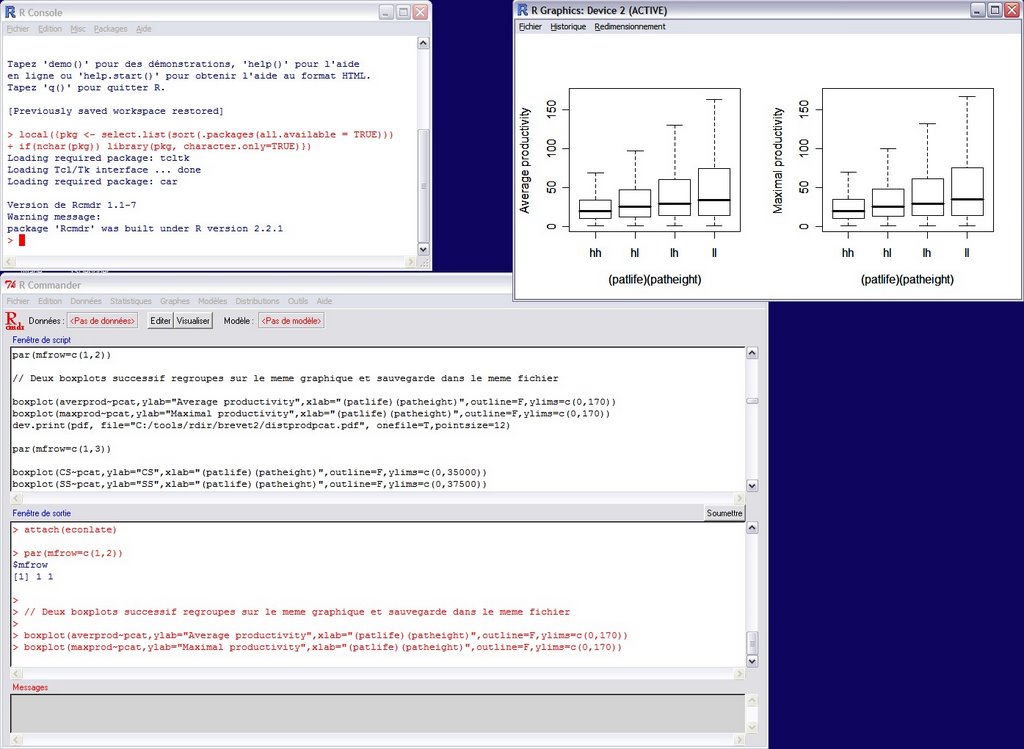
is the statistical open source software that I use for analyzing the results of my economic simulations and other statistical data. R is a very powerful tool developed by a considerable and very active community. It is not really very user-friendly when you use it out of the box, through the command line, but some of the included packages try to make easier your life (like the RCommander package that is visible on the screenshot above). Other visual user interface projects are also in development. For example, Sciviews already proposes two nice tools: a very flexible and powerful script editor Tinn--R and a graphical gui that replaces the standard Rgui, Sciviews-R. The latter enriches the standard Rgui with some widgets that give an easy access to obkects in memory, for example, and a more flexible editor (but it is also possible to use Tinn-R in combination with this GUI).
The main website of R is the www.r-project.org. You can also download R, other packages and tools from a CRAN repository close to you (check the list of the mirror sites here).

From the website of R:
R is a language and environment for statistical computing and graphics. It is a GNU project which is similar to the S language and environment which was developed at Bell Laboratories (formerly AT&T, now Lucent Technologies) by John Chambers and colleagues. R can be considered as a different implementation of S. There are some important differences, but much code written for S runs unaltered under R.
R provides a wide variety of statistical (linear and nonlinear modelling, classical statistical tests, time-series analysis, classification, clustering, ...) and graphical techniques, and is highly extensible. The S language is often the vehicle of choice for research in statistical methodology, and R provides an Open Source route to participation in that activity.
One of R's strengths is the ease with which well-designed publication-quality plots can be produced, including mathematical symbols and formulae where needed. Great care has been taken over the defaults for the minor design choices in graphics, but the user retains full control.
I really invite you to download R and begin to play with it. You can find very useful tutorials on R on the website, in the Contributed documentation page. Check, for example, “Using R for Data Analysis and Graphics - Introduction, Examples and Commentary” by John Maindonald. You can download the PDF file from this link.